Drupal is a content management software with a lot of useful and powerful features, like easy content authoring, reliable performance, and excellent security. The flexibility and modularity of Drupal is what gives the extra edge as a content management software. Its tools help us to build the versatile, structured content that dynamic web experiences need.
It is designed to be the perfect content management solution for admins and moderators, who needs both simplicity and flexibility. It accomplishes this through its modular approach to site building.
For more details about drupal, click here.
In this article, you will see how to use FusionCharts in combination with Drupal to create an interactive analytic dashboard. Let’s now move on to how you can create the perfect dashboard using FusionCharts and Drupal. Following are some of the use cases for different kinds of users:
To get the code in this blog working, we need to install the following components:
npm install fusioncharts
npm install fusionmaps
bower install fusioncharts
bower install fusionmaps
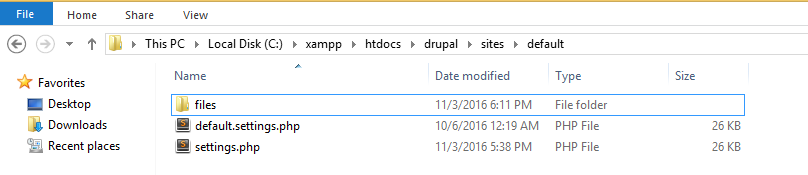
Inside the drupal folder, go through the path drupal\sites\default and duplicate the default.settings.php file and rename that duplicate file as settings.php.
Once done, create a new folder called files and keep that inside the default folder.
Now install the drupal using localhost.
Eg. https://localhost/drupal/
Install drupal by connecting the database. For detailed installation process click here.
After installing drupal, login to the site. Once you login successfully the drupal Welcome page will appear as shown below:
Click Structure in the admin bar, which provides several options as shown in the image below:
Click on Blocks
The Add block option appears. Click Add block to create the block for your dashboard.
*Fill the required fields, i.e. Block title and Block description.
After filling up the details, check the Block body which contains the code for the chart.
P.S- We have used FusionCharts Suite XT, PHP, and MySQL to create the dynamic charts for the dashboard.
Keep the data table required for the dashboard inside the database, to connect drupal at the time of installation.
The first part of the php code, helps you to connect with the database required for the dashboard.
connect_error) {
     exit("There was an error with your connection: ".$dbhandle->connect_error);
   }
?>
Extract files from the downloaded FusionCharts Suite XT and keep the fusioncharts.js and fusioncharts.charts.js file inside a folder and keep that folder inside the directory called modules inside the drupal folder.
e.g. C:\xampp\htdocs\drupal\modules\lib
Similarly, keep the fusioncharts.theme.fint.js inside the directory called themes inside the drupal folder.
In the second part of PHP code, include the paths of library files fusioncharts.js, fusioncharts.charts.js and fusioncharts.theme.fint.js using the drupal_add_js() function as shown below(Include these files inside any one block, the entire page will be able to use these script files, i.e. no need to add these files inside every block.).
 drupal_add_js('modules/lib/fusioncharts.js');
drupal_add_js('modules/lib/fusioncharts.charts.js');
drupal_add_js('themes/fusioncharts.theme.fint.js');
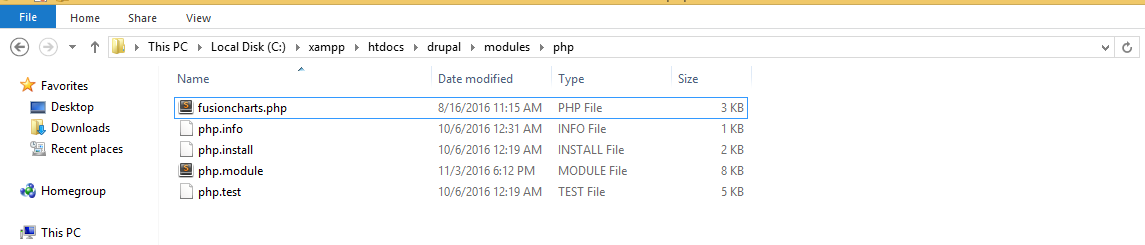
Download the fusioncharts php wrapper and keep the fusioncharts.php file inside modules/php folder.
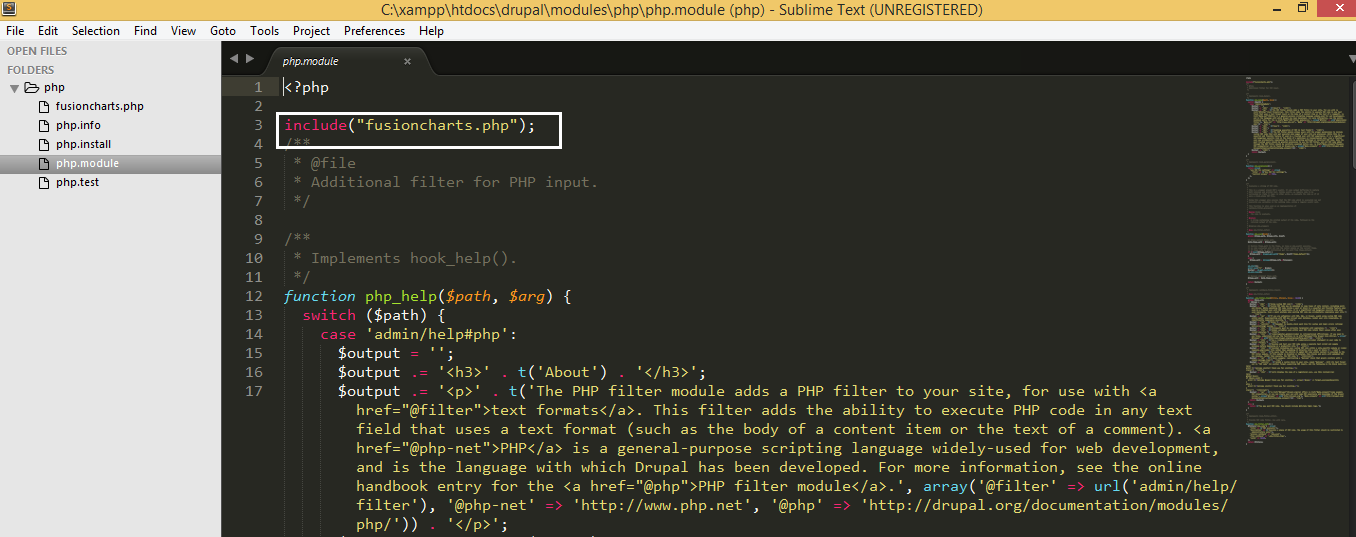
Include the fusioncharts.php inside the php.module code.
Once the FusionCharts php wrapper is included let’s get back to the code. Inside php tag, using sql query, fetch the data from the database.
$strQuery = "SELECT DISTINCT revenue_type, revenue_value,revenue_budget, expenditure_type, expenditure_value,expenditure_budget FROM financial_records";
 $result = $dbhandle->query($strQuery) or exit("Error code ({$dbhandle->errno}): {$dbhandle->error}");
Achieve the required json format using php,to render the chart.
 if ($result) {
     //Creating the chart object
     $arrData1 = array(
        "chart" => array(
                    "paletteColors" => "#23B7B7,#ED3132,#3CDAE0",
                    "bgColor" => "#EAEAEA",
                    "showLabels"=>"0",
                    "showBorder" => "0",
                    "use3DLighting" => "0",
                    "showShadow" => "0",
                    "enableSmartLabels" => "0",
                    "startingAngle" => "0",
                    "showPercentValues" => "1",
                    "showPercentInTooltip" => "0",
                    "decimals" => "1",
                    "captionFontSize" => "14",
                    "subcaptionFontSize" => "14",
                    "subcaptionFontBold" => "0",
                    "toolTipColor" => "#ffffff",
                    "toolTipBorderThickness" => "0",
                    "toolTipBgColor" => "#000000",
                    "toolTipBgAlpha" => "80",
                    "toolTipBorderRadius" => "2",
                    "toolTipPadding" => "5",
                    "showHoverEffect" => "1",
                    "showLegend" => "1",
                    "legendBgColor" => "#ffffff",
                    "legendBorderAlpha" => "0",
                    "legendShadow" => "0",
                    "legendItemFontSize" => "10",
                    "legendItemFontColor" => "#666666",
                    "useDataPlotColorForLabels" => "1",
                    "theme"=>"fint"
               )
          );

    //creating the data array
        $arrData1["data"]=array();
          while($row = mysqli_fetch_array($result)) {

                    array_push($arrData1["data"], array(

                          "label" => $row["expenditure_type"],
                          "value"=>$row["expenditure_value"]
                         )
                    );
          }

    //encoding the array in json format
      $jsonEncodedData_chart1 = json_encode($arrData1);

$expenditureChart = new FusionCharts("pie2d", "chart2" , "100%", "300", "chart-container2", "json", $jsonEncodedData_chart1);

//rendering the chart
      $expenditureChart->render();

      // closing db connection
      $dbhandle->close();
   }
?>
Finally define the div where the chart will render.
i.e.
Chart will render here!
Keep this code inside Block body.
Select the text format as php code. [ If this option doesn’t appear click on Modules. Scroll down to the PHP filter module and check the Enabled box.
Press the Save Configuration button
Now, again scroll down to the PHP filter module where two links have been added. The first is help. It’s not long and is worth reading, so check it out. The second link is permissions. Click on this to go to the Permissions page.
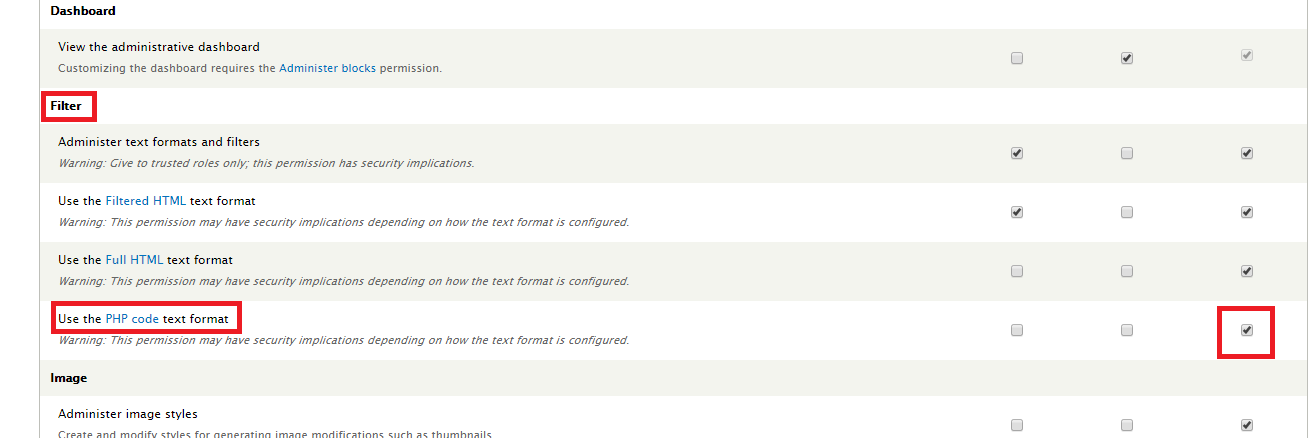
Scroll down to the Filter section. There is a new item called Use the PHP code text format and its checkbox for the Administrator is not checked. The permission box must be checked for the role that needs to use PHP code in order for the PHP filter to show on input boxes.
Finally click on Save permissions.
Inside the REGION SETTINGS, specify in which themes and regions this block is going to be displayed.
Once done save the block. Similarly construct other blocks and render the chart inside the block body, which are required for the dashboard.
Here is the snapshot of the final; dashboard.
Perfect isn’t it?
If you see any errors in your code, click here to download the complete source code of the dashboard we have created for this tutorial.
Are dashboards dying because of AI? If yes, what is the future of dashboards? The…
FusionCharts 4.2.3 is now available with an important security dependency update and fixes for legend…
We released updated FusionCharts SDKs for Angular, Svelte, React Native, and Flutter to support newer…
Quick answer: Creating an interactive React Gantt chart is simple. First, you need to install…
Quick Answer: The best JavaScript map library for data visualization offers a wide range of…
Quick Answer You can add interactive charts to a TypeScript project using a JavaScript charting…