Table of Contents
ionic start myapp This will automatically create all the dependencies required to create the app.project node_modules using the following command. npm install angular2 -fusioncharts --saveapp.module.ts file. [Path: src → app → app.module.ts]import { BrowserModule } from '@angular/platform-browser';
import { ErrorHandler, NgModule } from '@angular/core';
import { IonicApp, IonicErrorHandler, IonicModule } from 'ionic-angular';
import { SplashScreen } from '@ionic-native/splash-screen';
import { StatusBar } from '@ionic-native/status-bar';
import { MyApp } from './app.component';
import { HomePage } from '../pages/home/home';
// Import angular2-fusioncharts
import { FusionChartsModule } from 'angular2-fusioncharts';
// Import FusionCharts library
import * as FusionCharts from 'fusioncharts';
// Load FusionCharts Charts module
import Charts from "fusioncharts/fusioncharts.charts";
// Load themes
import themes from "fusioncharts/themes/fusioncharts.theme.fint";
@NgModule({
declarations: [
MyApp,
HomePage
],
imports: [
BrowserModule,
FusionChartsModule.forRoot(FusionCharts, Charts, themes),
IonicModule.forRoot(MyApp)
],
bootstrap: [IonicApp],
entryComponents: [
MyApp,
HomePage
],
providers: [
StatusBar,
SplashScreen,
{provide: ErrorHandler, useClass: IonicErrorHandler}
]
})
export class AppModule {}
home.ts file located in [Path: src → home → home.ts] home.ts file.import { Component } from '@angular/core';
import { NavController } from 'ionic-angular';
@Component({
selector: 'page-home',
templateUrl: 'home.html'
})
export class HomePage {
dataSource: Object;
constructor(public navCtrl: NavController) {
this.dataSource = {
"chart": {
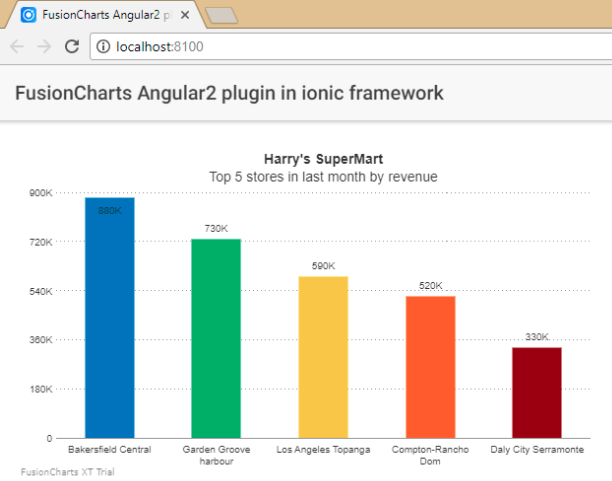
"caption": "Harry's SuperMart",
"subCaption": "Top 5 stores in last month by revenue",
"theme":"fint"
},
"data": [{
"label": "Bakersfield Central",
"value": "880000"
}, {
"label": "Garden Groove harbour",
"value": "730000"
}, {
"label": "Los Angeles Topanga",
"value": "590000"
}, {
"label": "Compton-Rancho Dom",
"value": "520000"
}, {
"label": "Daly City Serramonte",
"value": "330000"
}]
}
}
}
home.html file. [Path: src → home → home.html]<ion-header>
<ion-navbar>
<ion-title>
FusionCharts Angular2 plugin in ionic framework
</ion-title>
</ion-navbar>
</ion-header>
<ion-content padding>
<fusioncharts
width="600"
height="350"
type="Column2D"
dataFormat="JSON"
[dataSource]="dataSource">
</fusioncharts>
</ion-content>
ionic serveTo create pie charts and generate statistical data, you’ll find this list of the best…
To implement FusionCharts in a dynamically resizing flexbox layout, ensure that the chart's dimensions are…
At FusionCharts, we believe in empowering developers and businesses with cutting-edge data visualization tools that…
Ever had a data set that seemed more complicated than a Rubik's cube? You’re not…
We’ve all seen them in textbooks or presentations—those overlapping circles that simplify complex information into…
We’re excited to announce the upcoming release of FusionCharts v4.1—a groundbreaking step forward in the…
View Comments
thanks a ton this was really useful!
Glad it helped!
Your blog is very nice... Thanks for sharing your information...