Table of Contents
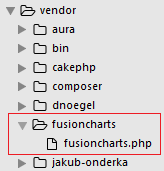
npm install fusioncharts npm install fusionmaps For Bower: bower install fusioncharts bower install fusionmaps FusionCharts also provides a dedicated PHP wrapper to create charts in PHP. [Download PHP Chart Wrapper]httpd-vhost.conf file of our apache web server. <VirtualHost *:80>
DocumentRoot /path/to/CakePHP framework
ServerName cakePHP-tutorial.localhost
SetEnv APPLICATION_ENV "development"
</VirtualHost>
Once we have made the changes in our config file, we will save the file and restart the server. We will now start our CakePHP skeleton application using this [https://cakephp-tutorial.localhost] URL to verify that we are on the right path. my_app\config\app.php file as shown below to establish the connection with the MySQL database. 'Datasources' => [
'default' => [
'className' => 'Cake\Database\Connection',
'driver' => 'Cake\Database\Driver\Mysql',
'persistent' => false,
'host' => 'localhost',
/**
* CakePHP will use the default DB port based on the driver selected
* MySQL on MAMP uses port 8889, MAMP users will want to uncomment
* the following line and set the port accordingly
*/ //'port' => 'non_standard_port_number',
'username' => 'db_user_name',
'password' => 'db_user_password',
'database' => 'db_name',
'encoding' => 'utf8',
'timezone' => 'UTC',
'flags' => [],
'cacheMetadata' => true,
'log' => false,
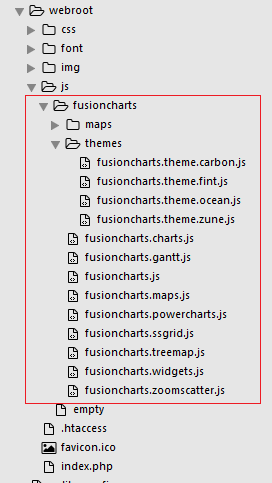
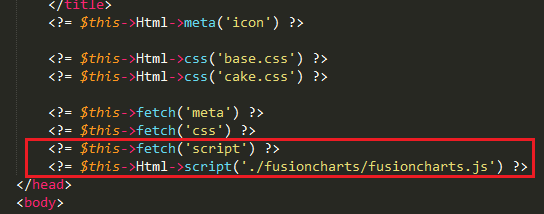
my_app/webroot/js/fusioncharts as shown below – my_app/src/Template/Layout/default.ctp file, present in the CakePHP application, and add the js file to that as the format shown below – src/Controller/FusionchartsController.php. <?php
namespace App\Controller;
use App\Controller\AppController;
class FusionchartsController extends AppController
{
public function index()
{
}
} src/Template/Fusioncharts. Now create the file Fusionchart/index.ctp. This will contain the code required to render the chart. Let’s create the file index.ctp inside src/Template/Fusioncharts, with the following contents: <?php
use Cake\Core\App;
//including the FusionCharts PHP wrapper
require_once(ROOT .DS. 'vendor' . DS . 'fusioncharts' . DS . 'fusioncharts.php');
use Cake\ORM\TableRegistry;
//connecting to the database table
$chartData = TableRegistry::get('mscombi2ddata');
//query to fetch the desired data
$query = $chartData->find();
//creating the array contains chart attribute
$arrData = array(
"chart" => array(
"animation"=>"0",
"caption"=> "Albertsons SuperMart",
"subCaption"=> "No. Of Visitors Last Week",
"xAxisName"=> "Day",
"yAxisName"=> "No. Of Visitors",
"showValues"=> "0",
"paletteColors"=> "#81BB76",
"showHoverEffect"=> "1",
"use3DLighting"=> "0",
"showaxislines"=> "1",
"baseFontSize"=> "13",
"theme"=> "fint"
)
);
foreach($query as $row) {
$value = $row["value1"];
array_push($data, array(
"label" => $row["category"],
"value" => $row["value1"]
)
);
}
$arrData["data"]=$data;
//encoding the dataset object in json format
$jsonEncodedData = json_encode($arrData);
// chart object
$columnChart = new FusionCharts("column2d", "chart-1", "100%", "300", "chart-container", "json", $jsonEncodedData);
// Render the chart
$columnChart->render();
?>
// Container to render the chart
<div id="chart-container"></div>
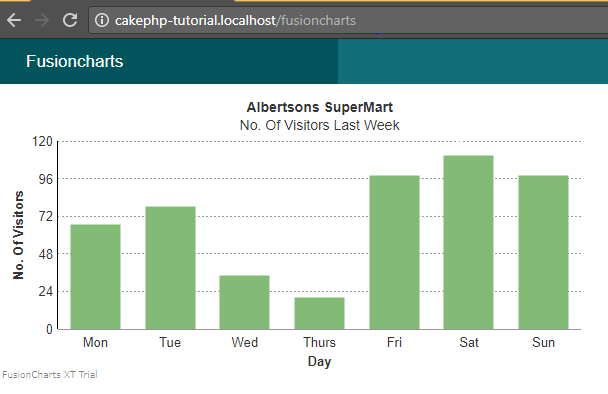
Now we will render the chart by executing the view page created for the FusionchartsController, via the browser using this URL: https://cakephp-tutorial.localhost/fusioncharts If you’ve followed all the steps, you should have a working chart as shown in the screenshot below: To create pie charts and generate statistical data, you’ll find this list of the best…
To implement FusionCharts in a dynamically resizing flexbox layout, ensure that the chart's dimensions are…
At FusionCharts, we believe in empowering developers and businesses with cutting-edge data visualization tools that…
Ever had a data set that seemed more complicated than a Rubik's cube? You’re not…
We’ve all seen them in textbooks or presentations—those overlapping circles that simplify complex information into…
We’re excited to announce the upcoming release of FusionCharts v4.1—a groundbreaking step forward in the…
View Comments
International charting group