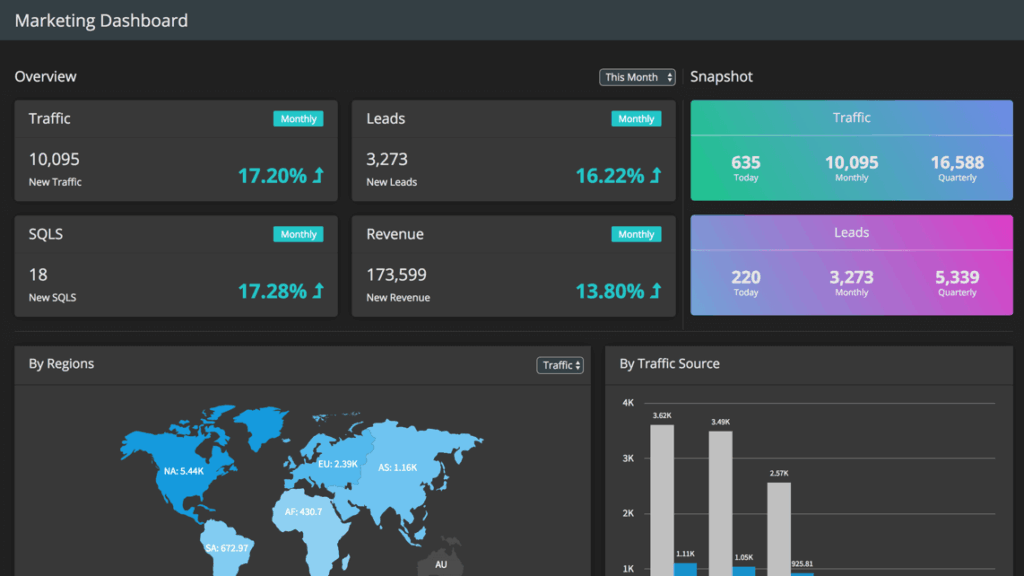
Marketing Dashboard
See the outcome of your marketing efforts with our Marketing Dashboard. Monitor the progress made towards each goal.
Key features

Get an overview of the traffic, leads, SQL, and revenue numbers
Monitor traffic and leads for today, this month and this quarter
Drill down on a region to see traffic and leads from different parts in the region
Understand the effectiveness of traffic and leads from different traffic sources
Monitor the progress made towards each goal
How to get started with this dashboard
Environment Setup
- Make sure you have Node JS >= 8.10 and npm >= 5.6 and Angular is installed on your machine
Project Files Setup
- Create a folder and extract the zip
- Navigate to the extracted folder in terminal
- Go to
marketing_dashboard_serverfolder and runnpm installornpm i - Go to
marketing_dashboardfolder and runnpm installornpm i - Start server, run the following
node app.js - Start client, run the following, in
clientfoldernpm run serve - Open URL https://localhost:8080/ into browser