Expense Dashboard of US Dept. of Veteran Affairs
This dashboard gives a single consolidated view of the expense incurred by the United States Department of Veteran Affairs with special focus on veteran and patient expense. The dashboard comprises multiple individual tools, giving more exploratory capability to the user to understand the distribution and trend. It can be used either by a State head, or a regional head, or a country head, to explore and identify patterns of expenses for any specific year and thereby aid them in making effective decisions.
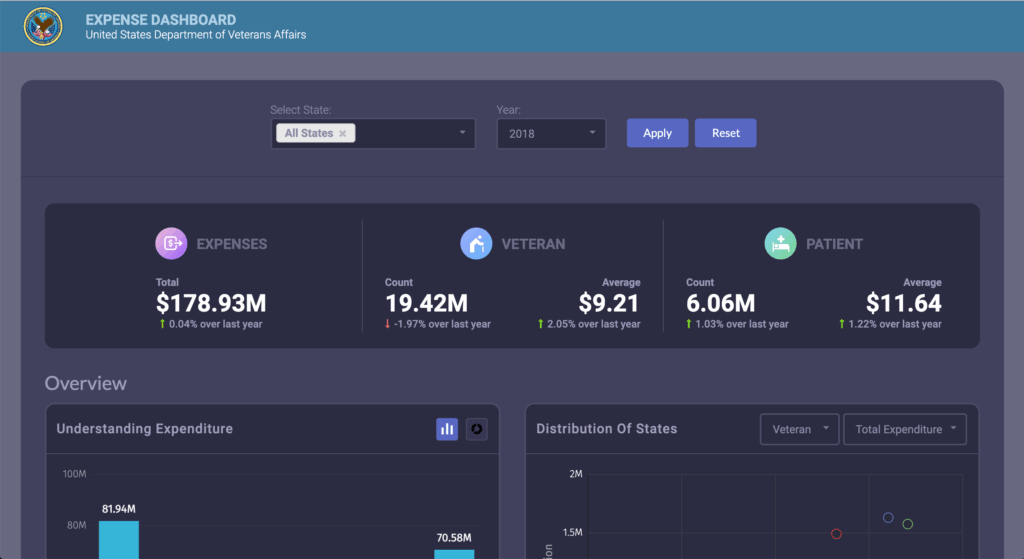

Know the total expense, expense per veteran, expense per patient and their growth from last year, of any State for any given year.
Know the growth in veteran and patient count of any State for any given year.
Understand the classification of total expense for a given year.
Explore the distribution of States in terms of veteran or patient population and type of expenditure.
See the trend of veteran or patient population and type of expenditure over the last 10+ years.
How to get started with this dashboard
Environment Setup
- Make sure you have Node JS >= 8.10 and npm >= 5.6
Project Files Setup
- Create a folder and extract the zip
- Navigate to the extracted folder and install the dependencies
npm installornpm i - To start the server
npm run start - Open URL https://localhost:3000/ into browser