Weather Dashboard
View complete climate conditions with our weather dashboard, built for localized data monitoring, analyzed by city or even specific sub-regions. Comply to global norms with our Celsius/Fahrenheit toggle and keep an eye on acceptable thresholds, ensuring air quality remains in-line. Embed the dashboard inside more overarching apps like day planners, driver assistance, and navigation tools to keep users informed.
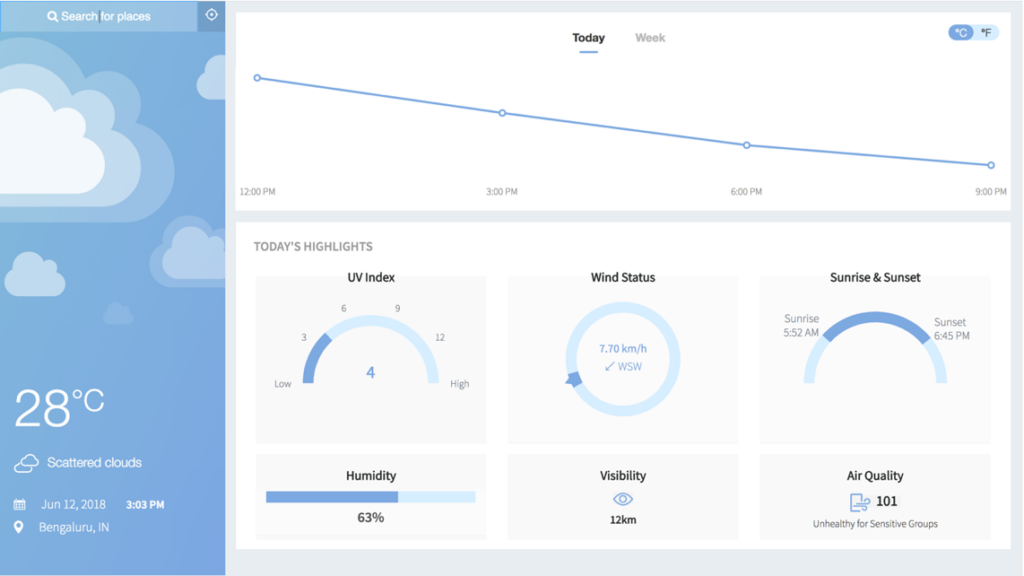

Stay up to date on trends & forecasts with accurate mapping of past numbers, from start-of-day/start-of-week, along with predictive conditions till EOD/EOW.
View current weather anywhere in the world with a simple search, ensure friends, family, and employees are okay, and make your travel plans run smoothly.
View all key conditions at a glance with zero coding, including UV index, wind status, sun times, humidity, visibility, and air quality.
Enjoy a clutter-free interface and reveal key information only when you hover over the tooltip - eg. hover over the 3 PM datapoint and view the exact temperature, without showing a Y-axis on the canvas.
Know exactly when the data was pulled with a timestamp, automatically updated on every search/refresh.
How to get started with this dashboard
Environment Setup
- Make sure you have Apache
Project Files Setup
- Create a folder and extract the zip
- Copy the folder
smart-weather-dashboardinto the root ofhtdocs - Browse to URL https://localhost:8080/smart-weather-dashboard/
(Note: You might have to change the port number based on your Apache configuration)