Are dashboards dying because of AI? If yes, what is the future of dashboards?
The short answer is NO.
Remember what happened to maps when GPS came along. GPS didn’t kill maps or make them obsolete. We used them differently. Instead of pulling out a map, following roads and working out the best route ourselves, we could just ask, “How do I get there?” and get an answer in seconds.
Generative AI is changing how we use dashboards in a similar way.
The dashboard isn’t disappearing; its job is changing. They’re evolving from places where people search for answers into systems that can help deliver those answers.
Earlier, when you wanted to check sales, you opened the sales dashboard. Looking into churn? Open a different one. Trying to understand operations? Hunt down the right report.
AI has changed this workflow. Now, instead of manually adjusting filters, you can simply ask, “Why did revenue fall last quarter?” and explore relevant metrics, trends, and possible explanations.
The older idea of a dashboard:
“Here is all the data. Explore it and find the answer.”
Now, advanced AI-powered analytics:
“Ask your question. Here is the answer, with the relevant data behind it.”
So perhaps the better question isn’t, “Are dashboards dying?” It’s “How is generative AI changing the role of dashboards in the way we explore business data?”
And that’s where things get interesting. Let’s break it down step by step.
Quick Answer
Dashboards are not dying, but reinventing. The future of dashboards is more powerful, with generative AI, where you can simply ask plain questions to pull specific data from your dashboards and receive alerts when something important changes. Dashboards still help people spot patterns and understand the data behind those answers. The goal isn’t to replace dashboards with AI, but to bring both together to make data easier to explore and understand.
Table of Contents
Key Takeaways
- AI lets users ask questions about their data in plain language, instead of exploring a huge matrix.
- With less manual monitoring, AI agents can monitor data, flag important changes, and even explain why a certain outcome occurs.
- Dashboards are evolving, not disappearing.
- Charts still help people spot patterns, understand data, and check AI-generated answers.
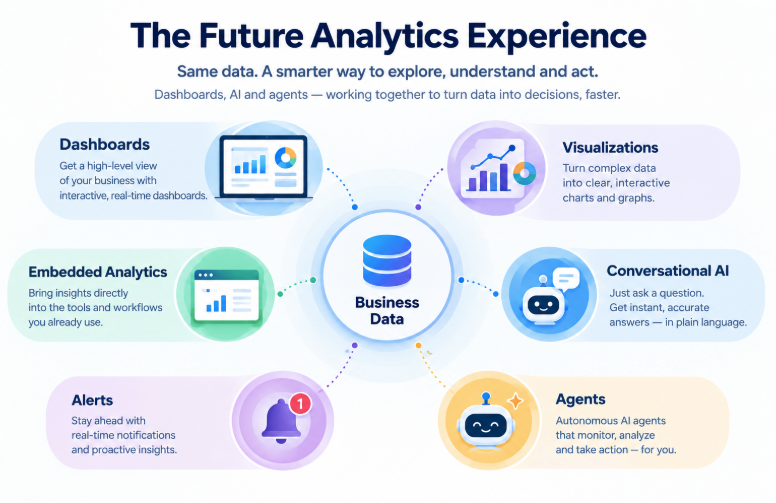
- The future combines dashboards, AI chat, alerts, and embedded analytics.
- Developers should make visualizations part of a wider AI-powered analytics experience.
Why Are People Saying Dashboards Are Dying?
To understand this, first, we need to see why traditional dashboards are losing appeal.
With traditional dashboards, you can see what happened, but finding the right data and understanding ‘WHY’ something changed can take time. Beyond that, multiple dashboards often create overlap between teams, fixed layouts limit further exploration, and switching between apps ultimately disrupts the workflow.
New generative AI analytics address these problems by making it easier to explore data and can even predict “WHY” something happens.
In its July 2026 report, IDC argues that AI can bring insights directly into tools like CRM, email, and Teams, helping users act faster.
But this is more about reducing friction than making dashboards obsolete. Dashboards still have
a role to play.
The Dashboard Is Becoming Conversational
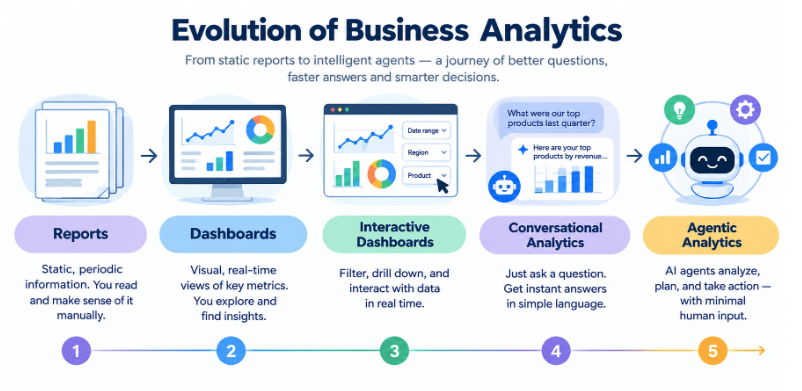
Another clear sign dashboards aren’t dying is what big BI vendors like Google Looker Studio and Microsoft Power BI are doing with them. If you look, they are not retiring the dashboard. They are adding conversation to it.
-
Looker
Google’s own data analytics platform, Looker, is now powered by automated metric monitoring and natural-language prompts that work within the context of the dashboard you are already viewing. You do not leave the chart to ask about it.
-
Power BI
Microsoft’s Copilot in Power BI supports AI-assisted exploration. Now users can predict future chart values, build complex reports, even DAX formulas or trend breakdown visuals in seconds. They are just adding more capabilities to their dashboards with AI.
-
Tableau
Tableau is empowering its business dashboards with conversational analytics through Tableau Agent, along with AI-assisted visual exploration. The dashboard remains, while conversational AI adds another way to explore the data.
To learn more about modern dashboard design best practices, read here.
What is ‘Pull Analytics to Push Analytics’?
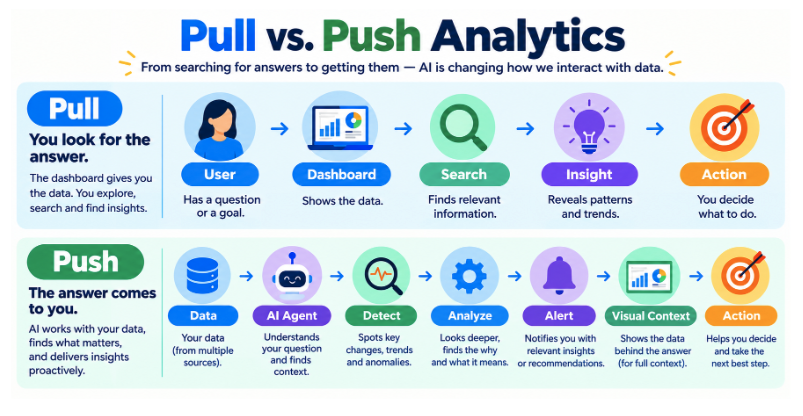
The simplest way to understand this module:
Remember, we used to check dashboards to know the data trends; now we get Alerts.
When we open dashboards to check data and find insights. This is called pull analytics.
With push analytics, we simply don’t need to check dashboards constantly. With proactive analytics, systems can monitor defined metrics, detect unusual changes, and notify us when something important or unusual happens.
- Pull analytics: User → Dashboard → Insight → Action
- Push analytics: Data → AI agent → Detect change → Alert → Visual context → Action
But this doesn’t mean dashboards are going away. We still need charts and visual context to understand what changed and decide what to do next.
What AI Does Better Than Traditional Dashboards
AI can be particularly useful for:
- Ad hoc questions that nobody built a dashboard for
- Natural-language interaction, which lowers the learning curve for non-analysts
- Summarization of large or messy data
- Root-cause exploration, or at least a head start on it
- Finding relevant data across many sources and reports
- Personalized insights based on role or past behavior
- Automated monitoring and proactive alerts
What the Next Generation of Business Dashboards Could Look Like
We do not expect dashboards to vanish. We expect them to evolve. Here is what that could look like.
-
AI-generated explanations
Charts will increasingly come with a short written explanation of what changed and why it may matter.
-
Conversational exploration
You will be able to ask, “Why did this spike happen?” right beside the visualization, without leaving it.
-
Adaptive visualizations
AI could pick or adjust the chart type based on the question being asked, so the view fits the question instead of the other way around.
-
Proactive insights
Dashboards will surface changes on their own instead of waiting for someone to notice them.
-
Embedded analytics
Insights will show up inside CRM, ERP, SaaS products, Slack, Teams, and other business applications, not only on standalone BI portals.
If you want to go deeper, our posts on interactive dashboards and interactive data visualizations cover filtering, drill-downs, and real-time exploration.
Does AI Eliminate the Need for Trusted Data?
This is the most important thing we need to understand. AI is only as good as the data behind it. For example, imagine an online store using AI to track sales. If the system has duplicate orders or missing sales data, it might report the wrong revenue or suggest that a product is losing popularity when it isn’t.
Therefore, even a clear answer can be wrong if the data is poor. For people to trust AI insights, businesses need:
- Good-quality data
- Clear metric definitions
- Proper data context
- Strong data governance
- The right access permissions
Forrester and Google both highlight the importance of trusted data and clear business context in AI-powered analytics. In short, adding AI is not enough. The data behind it must be reliable.
What This Means for Developers Building Analytics Products
For developers, the goal isn’t to choose between AI and charts, but to make them work together. In simple words, it means:
- See charts alongside AI-generated explanations
- Watch visualizations update based on natural-language queries
- Use dashboards that sit inside application workflows
- Drill into AI-generated conclusions
- Check the visual evidence behind an AI answer
- View real-time visualizations next to agent-generated alerts
This is where we see our own role. FusionCharts helps developers add interactive charts and maps to applications, while AI handles tasks like answering questions and summarizing data.
Final Verdict
Are dashboards dying? Clearly, no.
The future of dashboards isn’t about replacing them with AI. It’s about making them more useful.
AI is reducing the work people need to do to find insights. That is a real and welcome change. But business data still needs ways to reveal patterns, provide context, communicate findings, and help people verify conclusions.
AI changes how we ask. Visualization changes how we see. The strongest analytics experiences will bring both together.
Building smarter dashboards? FusionCharts helps you add interactive charts and visualizations to your applications. Try Ask FusionDev AI to explore how AI can help you build and improve charts.
FAQs
Are dashboards becoming obsolete because of AI?
No. AI is changing how people find insights, but dashboards remain useful for monitoring, comparison, and context. Gartner recommends modernizing dashboards rather than eliminating them, and major BI platforms are adding AI to their dashboards instead of removing them.
What is conversational analytics?
Conversational analytics lets people ask questions about their data in plain language and receive answers, summaries, or charts in response. It is also called conversational BI. It reduces the need to build filters or queries manually.
How is AI changing business data visualization dashboards?
AI is adding natural-language questions, automated summaries, proactive alerts, and agent-driven monitoring to dashboards. The dashboard becomes part of a broader experience, not the only way to explore data.
Will AI replace data visualization?
Unlikely. AI can explain and summarize, but charts still help you spot patterns, understand context, and verify AI-generated results faster. The more likely future combines both.