Project timelines can quickly become difficult to manage when multiple tasks, teams, and dependencies are involved. Whether you’re building a project management platform, resource planning tool, construction scheduling system, or enterprise dashboard, users need a clear way to visualize project progress. They also need to understand how tasks relate to one another.
This is where Gantt charts become valuable.
A Gantt chart is one of the most widely used visualizations for project planning and scheduling. It displays tasks along a timeline, helping users track progress, manage dependencies, allocate resources, and identify potential bottlenecks.
Modern web applications often require much more than a static timeline. Users expect features such as:
- Task dependencies
- Resource allocation
- Timeline visualization
- Drag-and-drop scheduling
- Milestone tracking
- Progress monitoring
- Export and reporting capabilities
Building these features from scratch can be time-consuming and expensive. A dedicated Gantt chart library provides many of these capabilities out of the box, allowing development teams to focus on business logic rather than visualization infrastructure.
In this guide, we’ll compare five of the best Gantt chart libraries available in 2026:
- FusionCharts Gantt
- DHTMLX Gantt
- Syncfusion Gantt Chart
- Bryntum Gantt
- frappe-gantt
By the end, you’ll have a clearer understanding of which solution best fits your project’s requirements.
Table of Contents
Key Takeaways
- Gantt chart libraries help developers build project scheduling and timeline visualization features faster.
- The best libraries support task dependencies, milestones, drag-and-drop editing, and resource planning.
- Enterprise applications typically benefit from feature-rich commercial solutions.
- Open-source alternatives can work well for lightweight projects with simpler requirements.
- Framework compatibility, performance, customization, and export options should all be evaluated before choosing a library.
- FusionCharts, DHTMLX, Syncfusion, Bryntum, and Frappe-Gantt each serve different use cases and development needs.
What Is a Gantt Chart Library?
A Gantt chart library is a software component that enables developers to create interactive project timelines within web applications.
A standard Gantt chart displays tasks as horizontal bars positioned across a timeline. Each bar represents a task, and its length indicates the task’s duration.
For example:
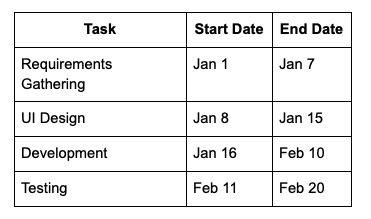
When visualized as a Gantt chart, these tasks appear along a timeline, making it easy to understand scheduling relationships and project progress.
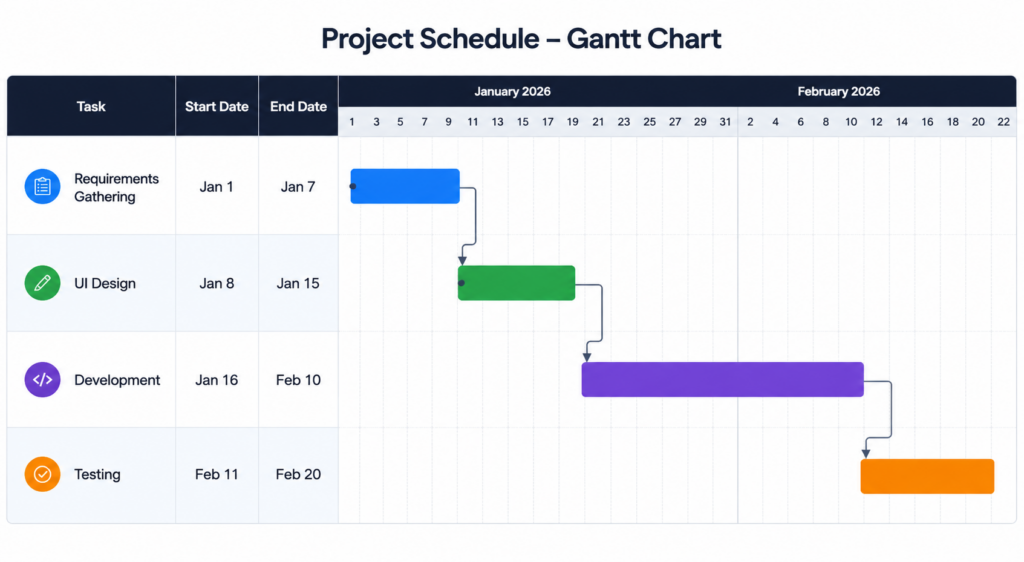
Modern Gantt chart libraries typically extend this functionality with:
- Task dependencies
- Milestones
- Resource allocation
- Critical path analysis
- Progress indicators
- Timeline zooming
- Interactive editing
These capabilities make Gantt charts useful across many industries and applications.
Common Use Cases of Gantt Charts
Gantt charts are widely used across industries because they make it easier to plan, schedule, and track complex projects. From software development and construction to resource planning and manufacturing, they help teams visualize timelines, manage dependencies, and monitor progress more effectively. Here are some of the most common use cases for Gantt charts.
Project Management
Project managers use Gantt charts to track tasks, deadlines, and dependencies across teams.
Software Development Planning
Development teams can visualize sprint schedules, release timelines, and feature roadmaps.
Construction Scheduling
Construction projects often involve dozens of interdependent activities that benefit from timeline-based planning.
Resource Management
Organizations use Gantt charts to monitor team workloads and allocate resources effectively.
Manufacturing Workflows
Production schedules, maintenance windows, and supply chain processes can all be visualized using Gantt charts.
Because of their flexibility, Gantt chart visualizations have become a standard feature in many project management and operations platforms.
What to Look for in a Gantt Chart Library
Not all Gantt chart libraries offer the same capabilities. Before choosing a solution, it’s important to evaluate how well it aligns with your project’s requirements.
Interactivity
Modern users expect interactive experiences.
A quality Gantt chart library should support:
- Drag-and-drop task movement
- Task resizing
- Milestone editing
- Timeline zoom controls
- Interactive tooltips
These features allow users to manage schedules directly from the chart instead of switching between multiple interfaces.
Why It Matters
Interactive editing improves productivity and creates a more intuitive user experience.
Dependency Management
Dependencies are one of the most important aspects of project scheduling.
For example:
- Task B cannot begin until Task A is completed.
- Task C depends on both Task A and Task B.
A strong Gantt chart library should provide:
- Visual dependency lines
- Automatic dependency calculations
- Critical path support
- Dependency validation
Why It Matters
Projects become difficult to manage when dependencies are not clearly visible.
Framework Compatibility
Most modern applications are built using frontend frameworks.
Before selecting a library, verify support for:
- React
- Angular
- Vue
- JavaScript
- TypeScript
Framework integrations can significantly reduce implementation effort.
Why It Matters
Native integrations help teams deploy charts faster while maintaining cleaner codebases.
Customization
Every application has unique branding and UI requirements.
Look for libraries that support:
- Themes
- Custom colors
- Custom task templates
- Styling options
- Custom tooltips
- Localization
Why It Matters
Customization helps ensure the chart matches the rest of your application’s design.
Performance
Some applications need to display hundreds or thousands of tasks simultaneously.
Performance features to evaluate include:
- Virtual scrolling
- Efficient rendering
- Lazy loading
- Timeline optimization
- Large dataset support
Why It Matters
Poor performance can negatively affect user experience and application responsiveness.
Export and Printing
Many users need to share schedules and reports with stakeholders.
Export capabilities may include:
- PDF exports
- PNG exports
- Excel exports
- Print-friendly layouts
Why It Matters
Built-in export functionality saves development time and provides additional value to end users.
After evaluating these criteria, let’s compare the top Gantt chart libraries available in 2026.
Top Gantt Chart Libraries Compared
The best Gantt chart library for your project depends on your requirements, budget, and application complexity. Some libraries focus on enterprise-grade scheduling and resource management, while others prioritize simplicity and ease of implementation. Here’s a closer look at five leading options available in 2026.
1. FusionCharts Gantt
Overview
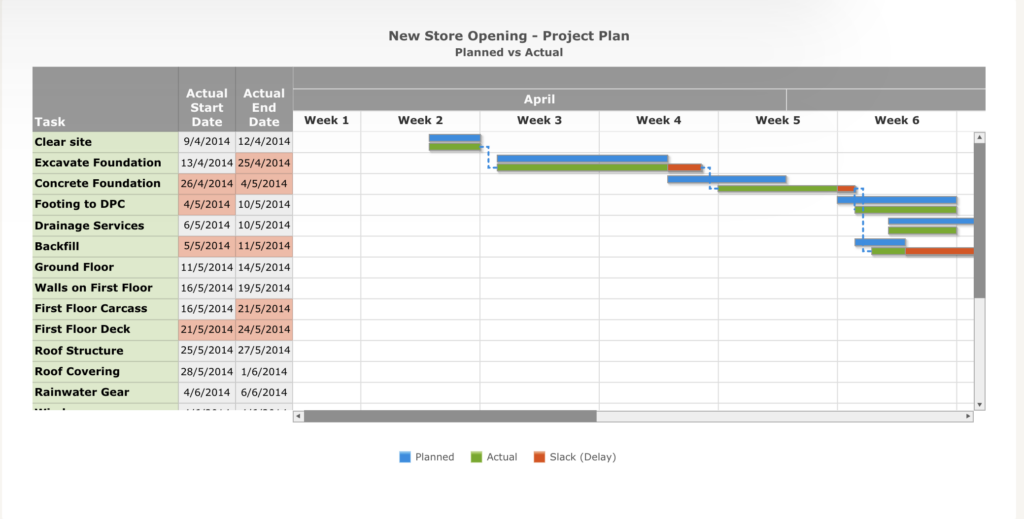
FusionCharts offers a dedicated Gantt chart component for building interactive project scheduling and timeline visualizations. It enables developers to create feature-rich Gantt charts that help users plan projects, track progress, manage task dependencies, and visualize milestones. With support for JavaScript and popular frameworks, FusionCharts can be integrated into a wide range of web applications, from project management platforms to enterprise dashboards.
Key Features
- Interactive Gantt chart visualization
- Milestone tracking
- Task dependency support
- Customizable tooltips
- Zooming and scrolling capabilities
- Export to PDF, PNG, and other formats
- Cross-browser compatibility
- Extensive customization options
- Responsive design support
Pros
- Enterprise-ready solution
- Comprehensive documentation and learning resources
- Easy integration with JavaScript frameworks
- Strong customer support and regular updates
- Broad charting ecosystem beyond Gantt charts
Cons
- Requires a commercial license for production use
Pricing
FusionCharts offers commercial licensing with pricing based on project and business requirements. A free trial is available for evaluation.
Best For
Enterprise applications, business dashboards, project management platforms, and organizations looking for a comprehensive data visualization solution with Gantt chart capabilities.
2. DHTMLX Gantt
Overview
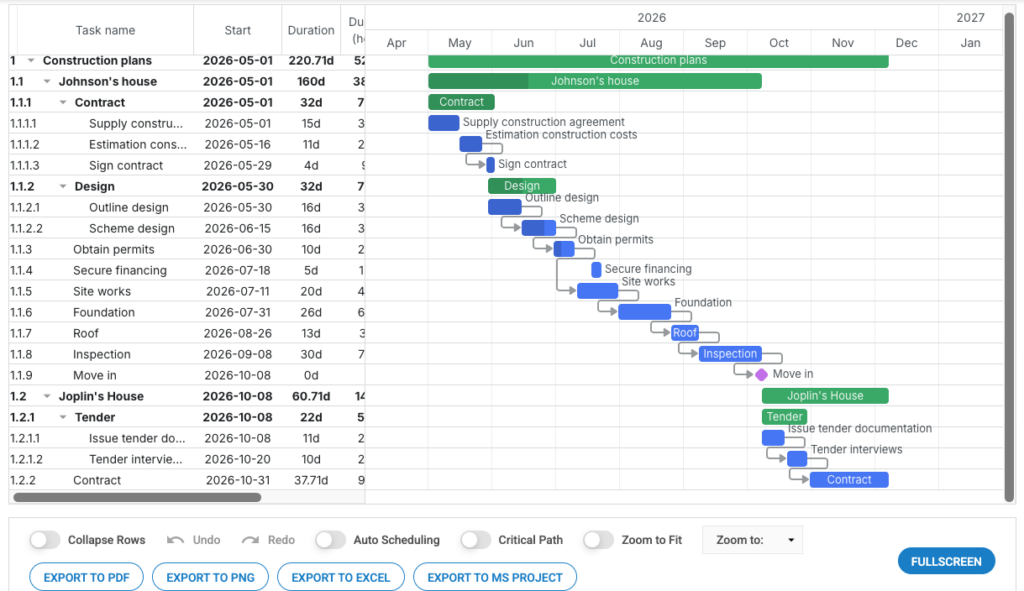
DHTMLX Gantt is a feature-rich JavaScript Gantt chart library designed for building project management and scheduling applications. It provides advanced planning capabilities, making it a popular choice for teams that need detailed project tracking, resource management, and dependency visualization. The library offers a high level of customization and supports integration with modern web applications.
Key Features
- Task dependency management
- Resource allocation and workload tracking
- Critical path analysis
- Baseline comparison for project monitoring
- Drag-and-drop task editing
- Milestone management
- Multiple timeline scales
- Export to PDF and Excel
- Customizable task templates and styling
Pros
- Comprehensive project management functionality
- Advanced scheduling and dependency features
- Highly customizable interface
- Suitable for complex project planning scenarios
Cons
- Many advanced capabilities are only available in paid plans
- Can have a steeper learning curve than simpler alternatives
Pricing
DHTMLX Gantt offers a free version with basic functionality, while advanced features and commercial usage require a paid license.
Best For
Advanced project management systems, resource planning applications, and organizations that require detailed scheduling, dependency tracking, and critical path analysis.
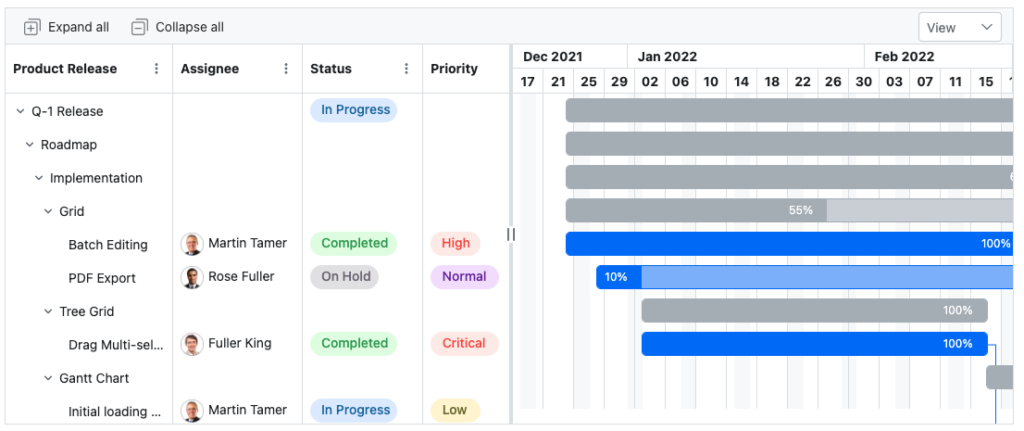
3. Syncfusion Gantt Chart
Overview
Syncfusion Gantt Chart is part of the broader Syncfusion UI component suite and is designed for building project management, scheduling, and resource planning applications. It offers a comprehensive set of project tracking features, along with integrations for popular JavaScript frameworks. Because it is included within a large ecosystem of UI components, it can be particularly attractive for teams building complex enterprise applications.
Key Features
- Resource allocation and workload management
- Multiple timeline and scheduling views
- Task dependency management
- Progress tracking and milestone support
- Export to PDF, Excel, and other formats
- Drag-and-drop task editing
- Sorting, filtering, and virtualization
- React, Angular, Vue, and JavaScript support
Pros
- Part of a large UI component ecosystem
- Extensive framework support
- Rich customization options
- Suitable for enterprise-scale applications
- Includes numerous complementary UI components
Cons
- Commercial licensing required for most business use cases
- Can be more complex than standalone Gantt chart solutions
Pricing
Syncfusion offers commercial licensing plans, along with a community license for eligible individual developers and small organizations.
Best For
Enterprise business applications, project management platforms, and development teams seeking a Gantt chart component as part of a broader UI framework ecosystem.
4. Bryntum Gantt
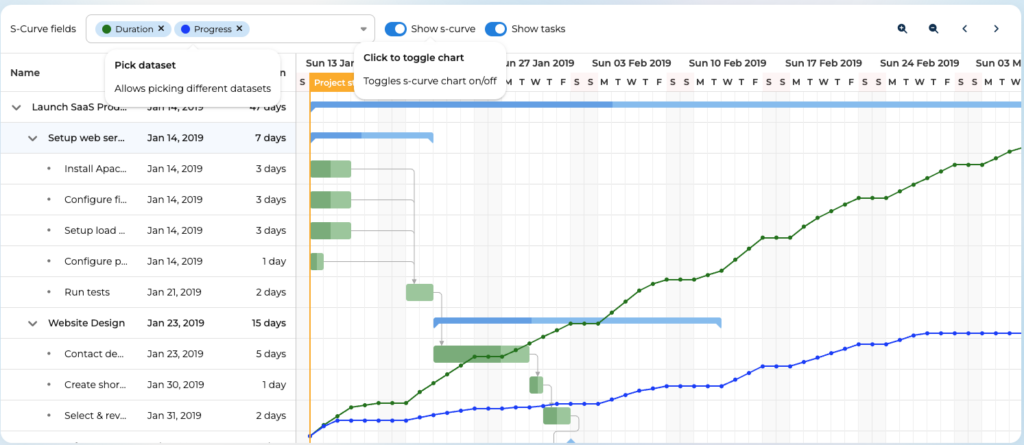
Overview
Bryntum Gantt is a high-performance JavaScript Gantt chart library built for complex scheduling and project planning applications. It combines a Gantt chart interface with an advanced scheduling engine, making it suitable for projects that involve sophisticated dependencies, resource allocation, and timeline calculations. The library integrates with modern frontend frameworks and is designed to handle large datasets efficiently.
Key Features
- Advanced scheduling engine
- Dependency visualization and management
- React and Angular support
- High-performance rendering for large datasets
- Critical path analysis
- Resource management capabilities
- Drag-and-drop task editing
- Timeline zooming and customization
Pros
- Powerful scheduling and planning capabilities
- Excellent performance with complex projects
- Modern framework integrations
- Suitable for enterprise-scale applications
Cons
- Premium pricing may not suit smaller projects
- Advanced feature set can require additional implementation effort
Pricing
Bryntum Gantt is a commercial product with paid licensing plans for professional and enterprise use.
Best For
Complex scheduling applications, enterprise project management systems, manufacturing planning tools, and organizations that require advanced scheduling logic.
5. Frappe-Gantt
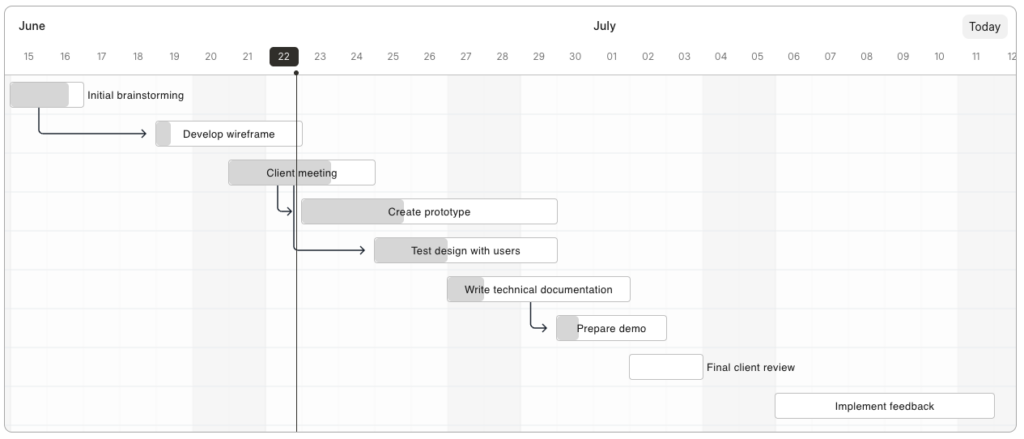
Overview
Frappe-Gantt is a lightweight, open-source JavaScript Gantt chart library that focuses on simplicity and ease of use. Unlike enterprise-focused alternatives, it provides the core functionality needed to create timeline visualizations without introducing significant complexity. Its small footprint and straightforward API make it a popular choice for developers who need a simple Gantt chart for web applications.
Key Features
- Lightweight and easy to implement
- Open-source licensing
- Simple setup and configuration
- SVG-based rendering
- Interactive task visualization
- Customizable styling options
- Framework-agnostic JavaScript implementation
Pros
- Free and open source
- Quick to set up and deploy
- Lightweight compared to enterprise solutions
- Suitable for small and medium-sized projects
Cons
- Limited advanced scheduling features
- Lacks some enterprise-grade functionality such as resource management and critical path analysis
Pricing
frappe-gantt is free to use under its open-source license.
Best For
Small projects, lightweight web applications, internal tools, prototypes, and developers looking for a simple Gantt chart solution without commercial licensing costs.
Gantt Chart Library Comparison
Each Gantt chart library offers a different balance of functionality, customization, and complexity. Some are designed for enterprise-grade project management, while others focus on simplicity and ease of implementation. The table below summarizes the key differences to help you identify the best option for your needs.
| Library | Open Source | Framework Support | Dependencies | Exporting | Best For |
|---|---|---|---|---|---|
| FusionCharts Gantt | No | JavaScript, React, Angular, Vue and more | Yes | PDF, PNG, JPEG, SVG | Enterprise dashboards and business applications |
| DHTMLX Gantt | Partial (Free version available) | JavaScript, React, Angular, Vue | Yes | PDF, Excel, PNG | Advanced project management systems |
| Syncfusion Gantt Chart | No (Community license available) | JavaScript, React, Angular, Vue, Blazor | Yes | PDF, Excel, CSV | Enterprise business applications |
| Bryntum Gantt | No | JavaScript, React, Angular, Vue | Yes | PDF and other export options | Complex scheduling applications |
| frappe-gantt | Yes | JavaScript (framework agnostic) | Basic support | Limited | Small projects and lightweight applications |
While all five libraries can create Gantt chart visualizations, their strengths vary significantly. Enterprise-focused solutions such as FusionCharts, Syncfusion, DHTMLX, and Bryntum offer advanced scheduling, dependency management, and export capabilities. In contrast, frappe-gantt provides a lightweight, open-source option for simpler projects that do not require extensive project management functionality.
Which Gantt Chart Library Should You Choose?
The best Gantt chart library depends on your application’s requirements, the complexity of your scheduling needs, and your available budget. Some libraries focus on enterprise reporting and visualization, while others prioritize advanced project management capabilities or lightweight implementation.
The table below provides quick recommendations based on common use cases.
| Use Case | Recommended Library |
|---|---|
| Enterprise Dashboards | FusionCharts |
| Project Management Software | DHTMLX Gantt |
| Business Applications | Syncfusion |
| Advanced Scheduling | Bryntum |
| Lightweight Projects | frappe-gantt |
If your application requires a combination of project scheduling and broader data visualization capabilities, FusionCharts can be a strong choice. For organizations building dedicated project management platforms, DHTMLX Gantt and Bryntum offer more advanced scheduling functionality. Meanwhile, Syncfusion fits well within enterprise business applications, and frappe-gantt remains a practical option for smaller projects with simpler requirements.
Gantt Chart Library vs Building from Scratch
When adding Gantt chart functionality to an application, development teams often face a choice: use an existing library or build a custom solution from scratch.
Using a Gantt Chart Library
A dedicated Gantt chart library can significantly accelerate development by providing essential functionality out of the box.
Advantages:
- Faster development and deployment
- Built-in scheduling and timeline features
- Dependency management support
- Export and reporting capabilities
- Ongoing maintenance and updates
- Documentation and technical support
Potential Drawbacks:
- Licensing costs for commercial solutions
- Less control over internal implementation
- Feature limitations compared to a fully custom solution
Building a Gantt Chart from Scratch
Creating a custom Gantt chart gives developers complete control over functionality and user experience.
Advantages:
- Maximum flexibility
- Full ownership of the codebase
- Custom features tailored to specific business requirements
Potential Drawbacks:
- Higher development costs
- Longer implementation timelines
- Additional maintenance responsibilities
- Increased testing and support requirements
For most teams, using a proven Gantt chart library is the more practical option. It reduces development effort and allows developers to focus on delivering business value rather than rebuilding common scheduling functionality.
Conclusion
Gantt charts play an important role in project planning, scheduling, and resource management. Choosing the right Gantt chart library can make it easier to build interactive timelines, manage dependencies, and deliver a better user experience.
The best solution depends on your project’s complexity, budget, and feature requirements.
- FusionCharts is a strong choice for enterprise dashboards and applications that require both Gantt charts and broader data visualization capabilities.
- DHTMLX Gantt and Bryntum Gantt are well suited for advanced project management and scheduling systems.
- Syncfusion Gantt Chart fits naturally into enterprise business applications that already use Syncfusion components.
- frappe-gantt provides a lightweight, open-source option for smaller projects and simple timeline visualizations.
Before making a decision, evaluate your requirements for scheduling complexity, framework compatibility, customization, performance, and budget. The right library can save significant development time while delivering the functionality your users need.
Ready to build interactive Gantt charts? Explore FusionCharts’ Gantt chart capabilities and see how they can help you create engaging project planning and scheduling experiences.
Start building interactive Gantt charts with FusionCharts Free Trial.
FAQs
What is the best Gantt chart library for JavaScript?
The best JavaScript Gantt chart library depends on your requirements. FusionCharts is well suited for enterprise dashboards, DHTMLX Gantt and Bryntum are ideal for advanced scheduling applications, while frappe-gantt offers a lightweight open-source alternative for simpler projects.
Are there free Gantt chart libraries available?
Yes. frappe-gantt is a free and open-source Gantt chart library. Some commercial solutions, such as DHTMLX Gantt and Syncfusion, also offer free or community editions with limited functionality.
Which Gantt chart library works with React?
Several libraries support React, including FusionCharts, DHTMLX Gantt, Syncfusion Gantt Chart, and Bryntum Gantt. These libraries provide React integrations that simplify implementation within React applications.
Can Gantt chart libraries handle task dependencies?
Yes. Most modern Gantt chart libraries support task dependencies and relationship visualization. Libraries such as FusionCharts, DHTMLX Gantt, Syncfusion, and Bryntum provide features for creating, displaying, and managing task dependencies.
What features should I look for in a Gantt chart library?
Key features to consider include task dependencies, milestone tracking, drag-and-drop editing, resource management, framework compatibility, export options, customization capabilities, and performance when handling large datasets.
Is it better to use a Gantt chart library or build one from scratch?
For most projects, using a Gantt chart library is the more efficient option because it provides built-in functionality, faster implementation, and ongoing maintenance support. Building from scratch may be appropriate when you need highly specialized functionality that existing libraries cannot provide.